Can You Screenshot Amazon Product Images and Use Them Offsite?
May 21, 2026
Let's talk about it...
Quick Answer
My short answer is NO. The problem with screenshots that most people don’t consider is it captures material you did not obtain through an approved Associates tool, and it may include pricing, ratings, layout, branding, or other Amazon-controlled content. None of that is yours to use.
A Disclaimer
I'm not a lawyer, and I'm not here to tell anyone what to do on their account. What's here is my interpretation of the TOS and what I personally do. Other people do things differently. Read the operating agreement, make your own decisions, and run your business the way that makes sense for you.
Can I screenshot an Amazon product image for Pinterest or social posts?
I read a heartbreaking post the other day on Facebook from a new Amazon Influencer that said she had been removed from the program for screenshotting a product image and posting it to Instagram. She had over 100 videos uploaded. Three weeks in the program. Gone. It’s not a rare story and it’s almost always the same mistake.
The question is whether you can screenshot an Amazon product image and use it in your offsite content like Pinterest pins, Instagram posts, Facebook graphics, blog images. My short answer is NO. But let me explain the why behind it because there are versions of this floating around the community where people have rationalized why it is OK to do. The following is why I do not.
What does the Amazon Associates TOS say about product images?
Amazon’s Associates Program Policies say affiliates may use Amazon-provided “Program Content,” including product images, only within the limits of the Associates agreement. In the “Content on your Site” section, Amazon says you may not “add to, delete from, or otherwise alter” Program Content, with a narrow exception allowing graphic images to be resized as long as the original proportions are maintained. In practice, that means Amazon product images used through affiliate tools should not be edited, cropped, overlaid with text, filtered, or otherwise modified beyond proportional resizing. Source: Amazon Associates Program Policies. *I had my friend Codex break that down for us but there is the publicly available link. Read it under 6. Content on your Site
The problem with screenshots that most people don’t consider is it captures material you did not obtain through an approved Associates tool, and it may include pricing, ratings, layout, branding, or other Amazon-controlled content. None of that is yours to use. The license, such as it is, doesn’t cover Amazon’s creative direction.
Why do other creators screenshot Amazon images?
Yes. They do. And some will never get caught. And some poor person just following what they think is right is going to be banned tomorrow morning. Life isn’t fair. People try every which way to justify their use of screenshots, or worse, selling a course telling you to do it.
If you have access, try reading this (I am not allowed to post or share it). Go to Creator University inside your Dashboard. Find Top Dos and Dont’s. Scroll down to Shoppable Content. Read that and tell me you still think this is unclear.
Still have doubts? OK, read the Amazon Influencers Video Content Guidelines. The last line under duplicate content. Yes, they are talking about video content. But, they just defined for you what they consider a copyright violation. To clear up any ambiguity, “product detail pages” are what you are potentially screenshotting.
To make it even more confusing, there are very large influencers that are rumored to be managed by Amazon that have a different set of rules. So if you see your favorite celebrity doing it, know they likely have special privileges the rest of us never will.
What is the difference between a screenshot and an approved Amazon image?
Let’s try a little experiment. Pull up ASIN B09P2SKRPQ (just go to Amazon and put that in the search bar). The listing image is a styled lifestyle photo with a flag windsock and porch background. Amazon’s styled image of the product.
Now run that same ASIN through the Canva Amazon Creator app and you get a clean product image, background removed, just the product. That is the asset Amazon made available inside the app we have been approved to use. It’s a different image entirely.
Many people think that screenshotting and removing the background solves the problem. ASIN B0F38QB6M3 is a good example of why it doesn’t. The official image has a background in it. A cleaned-up screenshot still isn’t the right asset and still didn’t come through an approved source.
How can I use Amazon product images offsite and stay compliant?
The Canva Amazon Creator App makes Amazon-provided product images available inside a specific Amazon Storefront publishing workflow. It tags the product for you and gives you the official image that you can add to your creation (within the rules) The app’s own export options — Post on Amazon and Save as Draft on Amazon — define exactly what that workflow is built for. Use it for Storefront. There has recently been discussion on if you can download it and post it to your socials as long as you don’t change it. Meaning you would bypass the step of posting it to your storefront first. Until there is an official publicly available statement to that I am not going to tell you it’s OK to do it. If you have access to the statement, make your own decision.
The TWO paths I use:
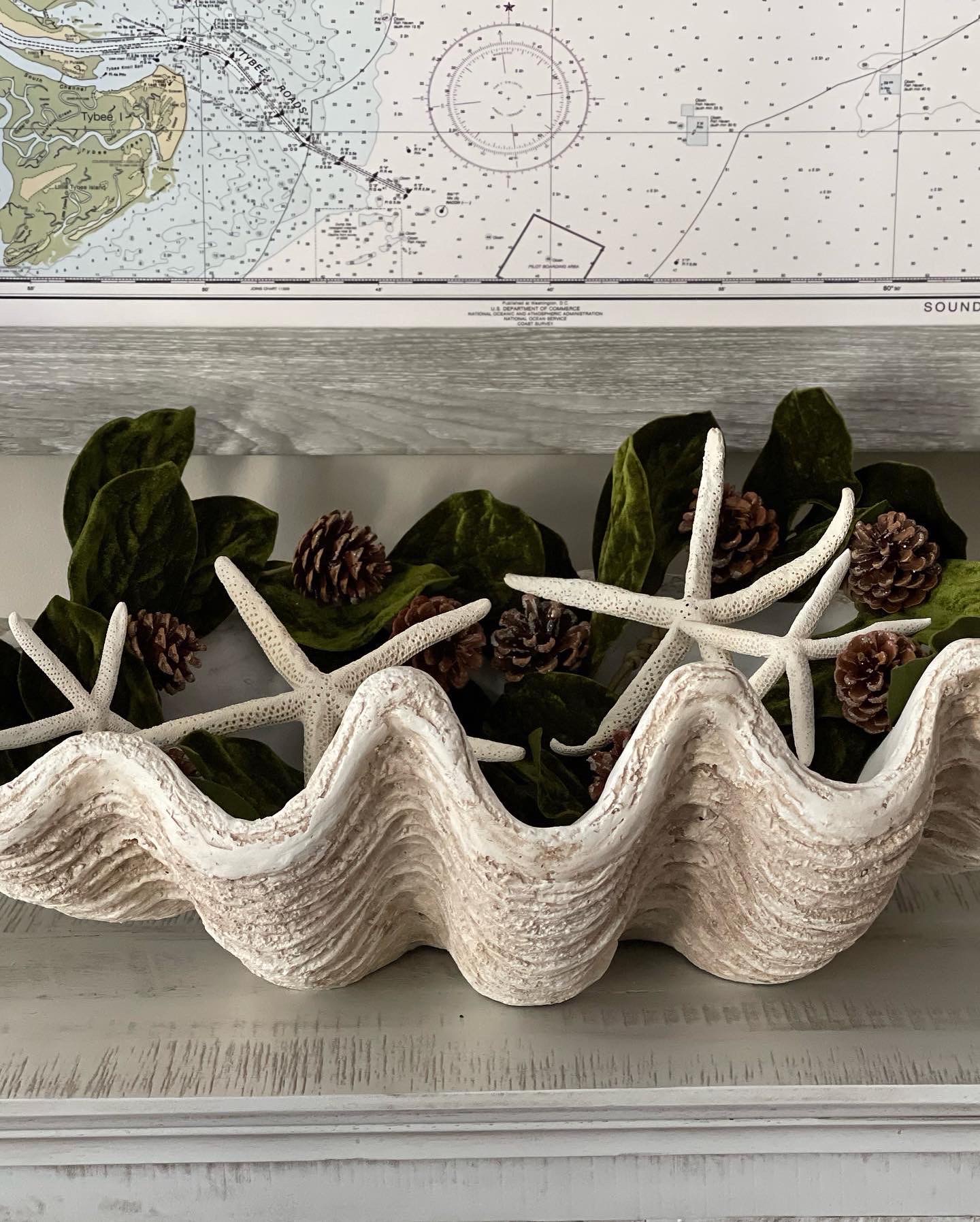
Your own photo. Take a picture of the actual physical product. Style it how you want. You can use it as your own original image, while still following Amazon’s rules including those for links, disclosures, and claims. Here is an example of what I mean. I own this shell. That is my entryway. I can link this to the shell product page using my affiliate link.
Canva Amazon Creators App → Storefront → Post to Social via the Share buttons.
Build your design using the Amazon Creator App, publish it to your Storefront, then use the Pinterest (or any other social listed) share button Amazon provides on the Storefront post itself. Amazon is initiating that share from an Amazon-hosted page, and the pin points back to Amazon. That is the cleanest external path I’m comfortable using for Amazon-originated product images. I do not download, screenshot, or manually re-upload the Storefront image anywhere. Tip: if you want to improve your pins SEO, after it is published on Pinterest go back and edit it and you should have all the ALT text options and so on available to you.
There are people that now have the Pinterest - Amazon integration. I do. So if you also have it you may find a different way to compliantly link those images you got from an approved source. Since not everyone does, Ill leave it for another article. If you don’t have access to this try linking your Pinterest account to your Amazon account and wait a few days. That seems to be working for some.
Always keep in mind, every product image that originates from Amazon needs to link back to an Amazon page. That requirement runs through the IP License. If the image does not link to Amazon, it does not belong in the pin. You should link to the product page ideally but I personally will link to an idea list or curation that contains those products, especially if it is a collage. If I link to an idea list or curation I make sure every product I placed on the image is in the linked list. If you choose to do this do not copy the link to your list from the browser. Go to the list or curation and click the share button and copy link from there.
Many people use Posttap to deeplink from Pinterest to Amazon and yes, if I was going to deeplink I would only use that service as there is an integration called Posttap for Creators. I have chosen not to right now until I see Amazon give an official go ahead.
I make sure Pinterest is listed in my Associates account and that the pin includes a clear affiliate disclosure at the top of the description. This is also important to remember if you are cross posting to international storefronts.
I do not manually add prices, star ratings, review quotes, Prime badges, or Amazon branding to pins. Never use the arrow, or any of their branding images unless you are sent them for a special event. Some creators do get press kits for certain events. If they didn’t send it to you, don’t use it!
Two Ways NOT For Most People:
SiteStripe is mentioned in the TOS as an approved method for generating image links through your Associates account. Unfortunately, most people report it hasn’t worked for them for a very long time, and that has been my experience as well.
The final method is the Amazon Product Advertising API, for those with a site or app with the technical setup to use it.
I take this so seriously because I am a dinosaur from the early 2000’s blogging era. I have been an affiliate just about as long as the program was really running. I have seen so many people lose their accounts. It’s just not worth it to me. I’ve poured way too much of my time into this program over decades. I hope this helps give you some food for thought on how you want to proceed.
🖋️ Barb
Barb Likos has been building online income since 2004. You may know her from the Grace, Inspired brand. The Offsite Playbook is where she writes as herself and not a brand.
Frequently Asked Questions
Can Amazon Influencers screenshot product images for Pinterest?
My short answer is NO. The problem with screenshots that most people don’t consider is it captures material you did not obtain through an approved Associates tool, and it may include pricing, ratings, layout, branding, or other Amazon-controlled content.
Does removing the background from a screenshot make it okay?
The official image has a background in it. A cleaned-up screenshot still isn’t the right asset and still didn’t come through an approved source.
What is a compliant way to use Amazon product images on Pinterest?
Build your design using the Amazon Creator App, publish it to your Storefront, then use the Pinterest (or any other social listed) share button Amazon provides on the Storefront post itself. That is the cleanest external path I’m comfortable using for Amazon-originated product images.
Do Amazon product images used offsite have to link back to Amazon?
Always keep in mind, every product image that originates from Amazon needs to link back to an Amazon page. If the image does not link to Amazon, it does not belong in the pin.
Struggling with trying to figure out the Amazon Influencer Program? After reading this guide, you'll know what to film next and have a manageable plan for getting to your first 100 videos.
About Barb | Founder of Storefront Launch
Barb was working with brands before “content creator” was a job title.
Back in 2008, she helped develop branded Twitter parties: live, hashtag-based conversations that brought companies and consumers together. She helped turn those conversations into something brands could buy, then spent years pitching campaigns, recruiting paid bloggers, organizing events, and teaching other women how to use social media for business.
She was part of the original wave of “mommy bloggers” (because apparently women building successful online businesses needed a cute little nickname). Her work included brand ambassador roles with Disney, Kraft, Verizon, and GMC.
Today, Barb brings that experience—and a master’s degree in education—to Storefront Launch. She helps women make sense of Amazon Influencer, Walmart Creator, and affiliate marketing, with practical ways to earn from the content they’re already creating. Less hype. More “okay, here’s how you actually do it.” Because, to loosely quote Lin-Manuel Miranda, she was “in the room where it happen(ed).”